
Pets
Atualizado em : 04/09/2026 14:47 (UTC-3)
Pets are some of Adventurers' most loyal and cute companions on their long journeys throughout Black Desert's world.
Their main reason for being is the auto-loot feature. Having fed pets allows Adventurers to cut through hordes of monsters without having to stop to pick up the dropped loot of every single defeated enemy. Instead, it is the pets that do this for them.
Check out how to get them, what roles they have, and what they can do on this page.
Meet your Pet Companions
While you can acquire a few pets as rewards from the main questline, some are given as login rewards, and even more can be obtained during temporary in-game and out of game events. They are mainly purchased from the Pearl Shop (hotkey: F3) with pearls.
The quests to obtain pets can be found in the Suggested tab of the Quest window (hotkey: O), in the section [ADV Support] Pets, Loyal Companions. These quests can only be completed once per Family.

The pets acquired like this are the following ones:
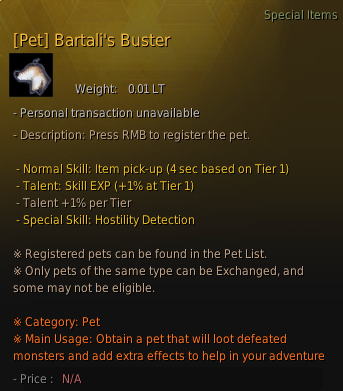
• Bartali's Buster
Once you have completed any iteration of the main questline for Balenos, the first territory you explore in the world of Black Desert, or as you progress through the main questline for Mountain of Eternal Winter, you can accept the quest "[Pet] Bartali's Buster" from Igor Bartali, the Chief of Velia, or Bayan in the Mountain of Eternal Winter territory.
Bartali's Buster comes with the talent +1% Skill Exp.
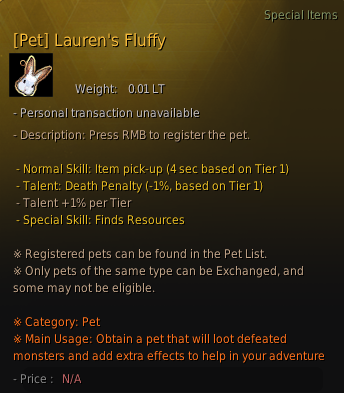
• Lauren's Fluffy
Complete any of the iterations of the main questline for Serendia, or progress through the main questline for Mountain of Eternal Winter, to unlock the quest "[Pet] Lauren's Fluffy" from any of the relevant NPCs in the main questline you have chosen to do.
Lauren's Fluffy comes with the talent -1% Death Penalty Reduction.
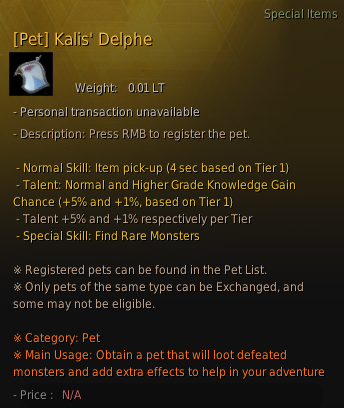
• Kalis' Delphe
Once you have completed any iteration of the main questline for Calpheon or progressed through the main questline for Mountain of Eternal Winter, you can accept the quest "[Pet] Kalis' Delphe" from Herman Feresio, Chairman of the Kalis, in Calpheon City or from Puteaux in the Mountain of Eternal Winter territory.
Kalis' Delphe has the +5% Normal and +1% Higher Grade Knowledge Gain Chance talent.
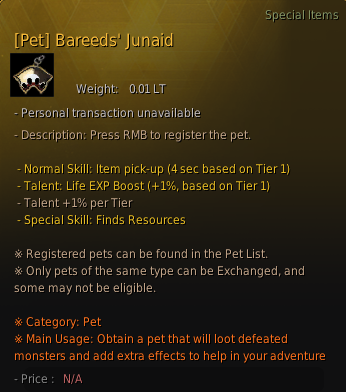
• Bareeds' Junaid
Once you have completed any iteration of the main questline for Mediah, you can accept the quest "[Pet] Bareeds' Junaid" from the Prince of Mediah, Prince Bareeds III.
Bareeds' Junaid comes with the +1% Life EXP Boost talent.
• Marumin's Squawky
After completing the main questline of Valencia, you can accept the quest "[Pet] Marumin's Squawky" from the member of the royal Family of Valencia you have finished the main questline.
Marumin's Squawky comes with the +5% Normal and +1% Higher Grade Knowledge Gain Chance talent.
• Prankkebi
After completing "The Eyes of Adventure" log (Chapter 8.5) in Land of the Morning Light, you will be able to obtain a dokkebi pet.
Prankkebi comes with the +1% Item Drop Rate Increase talent.
➤ Check the [Adventure Log] page for more information on this topic.
The pets you have received, either as a quest or event reward, or from the Pearl Shop, can be found as pet emblems in your character's inventory (hotkey: I), either in the Inventory or Pearl tabs.
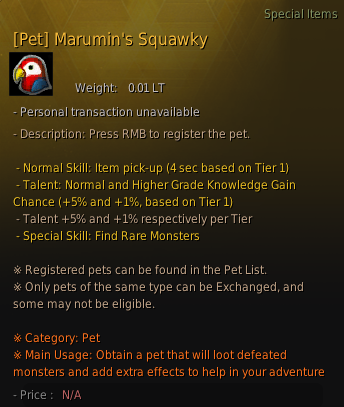
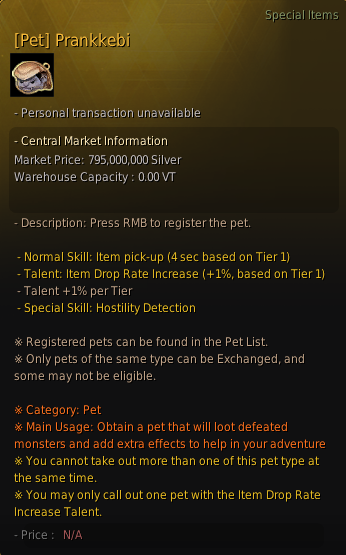
Once a pet has been obtained, it must be registered. To register a pet, right click on the pet emblem item, and when prompted, give the pet a name.
Summoning a Pet, the Pet List
The moment you finish registering a pet, the Pet List will open automatically. In other situations, you can find it in the Function tab of the main menu (hotkey: Esc).

You can also access it from the paw button below your health bar, which will only appear after you have obtained your first pet.


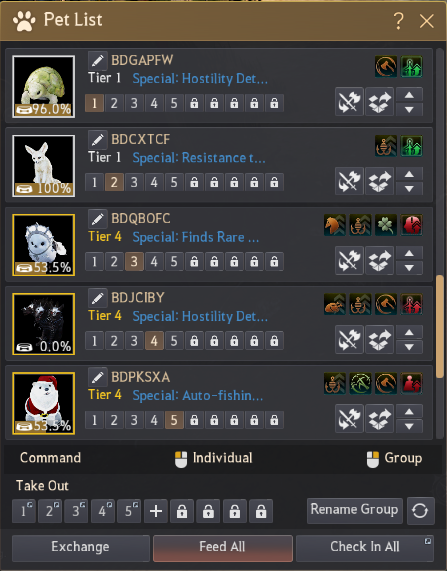
From your pet list, you can view all the pets that you currently possess, their information, and management options.
A pet can be summoned separately or as a group, with up to five pets summoned at any one time. To summon a pet, press the Take Out button to the right of the selected pet.

To summon pets as a group, assign a pet a flagged number by clicking on the appropriate icon beside their portrait. To summon the grouped pets, click the associated icon at the bottom of the pet menu. You can see both the individual number icons for checked-in pets and the option to take out a group with the same number in the two images above.
Caring for Pets & Feeding
If your pet is not picking up items, it means they are hungry!
Pets start with a hunger level of 100%. Once a pet is summoned, their hunger level will start to decrease. If a pet's hunger level reaches 0%, it will no longer retrieve loot while summoned.
Pets can be given food to raise their hunger level. Feed can be bought mainly from any Stable Keeper NPC and other Adventurers in the Central Market, and can be crafted through cooking.

When feeding a specific pet, or all of them at the same time, you can select the type of feed you want them to eat. Different types of feed, depending on their quality, will fill the hunger level at varying amounts.
Pet Tiers
The maximum tier a pet can reach is 5. At higher tiers, a pet can pick up loot at a faster rate, hold more talents, and their talent buffs increase.
A tier 1 pet will have 2 talents.
A tier 4 pet has 4 talents. The same is true for a tier 5 pet.

➤ Check the [Tier 5 Pet Training/Alpha Appointment] page for details regarding Tier 5 pets and how to obtain them.
Pet Behavior and Commands
Pet commands can be toggled and will affect the way a pet behaves.

• Behavior
A pet's behavior can be set to Cautious (slowest), Normal (default), or Agile (fastest); the more active their behavior mode is, the quicker they will pick up items, but at the same time, the faster their hunger level will decrease.
Make sure to take care of your pets' hunger level at all times, as they will not pick up items, nor will their talents take effect if their hunger level reaches 0.
Right click the behavior command icon to change the behavior of all your pets at the same time.
• Follow / Stay
Pets will continuously follow their owner until commanded to stay still. However, if the distance between the Adventurer and the pet is too great, the pet will reappear nearby.
• Special
This will toggle the pet's special ability.
• Fetch
This icon will toggle the pet auto-loot function.
In the example image above, the pet is set to be agile, to follow the Adventurer, and to have its special ability (auto-fishing time reduction) and the auto-loot function active.
Special Abilities
Each pet has its special ability. These are not enabled when pets are first summoned, and can be enabled through left click and right click. Left click will enable only the selected pet's special ability, and right click will enable it for all the summoned pets. There are the following special abilities:
• Hostility Detection
Marks Adventurers from hostile guilds and those who have negative karma.
• Finds Resources
Moves to and marks a gatherable resource every few seconds.
• Finds Rare Monsters
Moves to and marks rare (elite) monsters.
• Taunt Monster
Draws a monster to you.
• Resistant to Desert Illnesses
Provides heatstroke and hypothermia resistance.
• Auto-Fishing Time Reduction
Provides a reduction to the auto-fishing timer.
• Gathering Item Quantity Increase
Increases the quantity of items obtained via the gathering and hunting life skills.
For special abilities such as Hostility Detection and Finds Rare Monsters, it will leave a red marker on your screen when a target is found. If you do not want it to be displayed on your screen, click the pet command for special abilities to disable it, and it will no longer be displayed.
Refer to the table below for which special abilities can stack and which cannot. For those that cannot, it means that only the effect of a single pet with that special ability will be applied. If you have 4 pets summoned, all with the Auto-Fishing Time Reduction special ability, only the ability of 1 of them will be applied.
| Stackable Special Abilities | - Finds Resources - Hostility Detection - Taunt Monster - Finds Rare Monsters |
| Non-Stacking Special Abilities |
- Auto-Fishing Time Reduction (Only 1) - Resistant to Desert Illnesses (Only 1) - Gathering Item Quantity Increase (Only 1) |
Talent Effects
Pets can learn talent skills separate from their special ability. These are mainly divided into inherent talents and main skills. Talents are inherent to the pet, and are already there when you first obtain it. Main skills can be obtained when the pet's tier is improved. The different types of each can be seen below.
| Type | Skill Type List |
| Talent | - Life EXP Boost - Durability Reduction Resistance - Combat EXP Gain Boost - Skill EXP Boost - Death Penalty Reduction - Item Drop Rate Increase - Max HP Increase - Normal and Higher Grade Knowledge Gain Chance Boost - Weight Limit Increase - Mount EXP Increase - Big Ship Inventory Weight + |
| Main Skill | - Luck +1 - Combat EXP Boost - Karma Recovery Increase - Cooking/Alchemy/Processing/Farming EXP Boost - Fishing/Hunting/Training/Trading/Gathering EXP Boost - Fishing/Gathering Level +1 |
The number of learnable talents increases based on the pet's tier, so the higher the tier, the more of these skills that can be learned.
Pet Groups
Are you having trouble managing your pets?
If so, you can set up pet groups according to what you need and use them for. After this, you can use the Call Group feature to use your pets in a more convenient way.
Additionally, above the Feed All button, you will find the Rename Group button. This feature will help you differentiate the distinct groups of pets you have more easily.
Pet Exchange
The pet exchange option is the way Adventurers can improve the tier of their pets. The higher the pet's tier, the faster it will pick up loot, the higher the amount of talents it can learn, and the better it will be.
| Tier | Number of Learnable Talents |
| Tier 1 Tier 2 |
2 |
| Tier 3 | 3 |
| Tier 4 Tier 5 |
4 |
In this manner, what you are doing is exchanging various pets at once for a better one. The more pets are exchanged at once, the higher the odds of having a better resulting pet.
Up to 5 pets can be exchanged for 1 pet at a time.
During the pet exchange, you can change the registered pet's appearance and select the talents to be inherited from the exchange window. At this moment, if you acquire a pet tier that can learn more talents than the number of talents being inherited, then the pet will be able to learn additional ones.
However, please remember that pets are categorized into 5 types, and only pets of the same type can be exchanged together.
| Exchange Type | How to Obtain |
| Classic | Always available in the Pearl Shop. |
| Premium | Always available in the Pearl Shop. |
| Rare | Limited availability in the Pearl Shop. |
| Special | Obtainable in-game. |
| Event | Obtainable from events. |
Then, shall we learn how to exchange pets?
First, press the Exchange button from the Pet List menu, and the Exchange Pet window will appear.
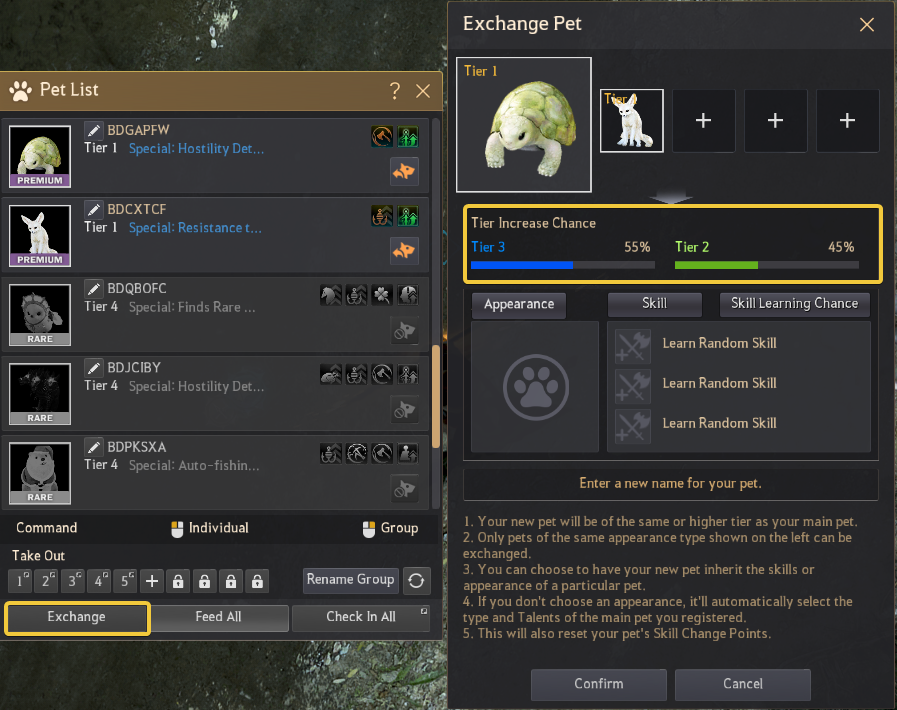
Among the currently checked-in pets, you press the Exchange button (yellow & orange pet symbol with arrows, seen above) to select the pet you want to exchange, or to cancel the selection.
Once you have selected at least 2 pets you want to exchange, you can select the desired appearance and talent skills to be inherited from your registered pets before exchanging them.
The tier increase chance goes up depending on the number of selected pets and their tiers when exchanging them. As seen above, exchanging 2 tier 1 pets has a 55% chance of obtaining a tier 3 pet, and a 45% chance of obtaining a tier 2 pet.

Adding another tier 1 pet to the mix increases the chance of getting a tier 3 pet to be absolute.
The higher the initial tier of the pets to exchange, the more pets will be required to have better odds of increasing the resulting pet’s tier.

As seen above, to reach a 100% chance of obtaining a tier 4 pet, in this case, 4 tier 3 pets of the same type (rare) are required.
Regarding the pet's appearance, it is important to remember that the resulting pet will inherit the talent of the pet's appearance you have chosen.
The appearance is not linked to its tier. For instance, when exchanging a tier 3 pet and a tier 1 pet, if you select the tier 1 pet's appearance, then regardless of the obtained pet's tier, its appearance will be the same as the tier 1 pet.

The Skill button will let you choose between a variety of obtainable skills.

The Skill Learning Chance button will show you the chance of the resulting pet obtaining each different talent.

Make sure to personalize the resulting pet as much as possible to obtain the desired outcome.
Do not forget to name it, either!
Remember!
If you have the pet Wizard Gosphy, you can exchange it together with any pet, except for another Wizard Gosphy, Young Crimson Dragon, Nouvermon, and Pit-A-Pat Mole. You can exchange Wizard Gosphy with pets of all tiers, and they have a bonus chance to improve the tier of the resulting pet.

If you have the pet Wizard Gosphy, you can exchange it together with any pet, except for another Wizard Gosphy, Young Crimson Dragon, Nouvermon, and Pit-A-Pat Mole. You can exchange Wizard Gosphy with pets of all tiers, and they have a bonus chance to improve the tier of the resulting pet.
Pet Appearance Change Coupon
Some pets' appearance may be changed through the Pet Exchange function explained above, or with a Pet Appearance Change Coupon item. This will alter the coloring of the pet, give the pet a unique pet costume, or change its look entirely. Not all pets have the ability to change their appearances.

The coupon guarantees a selected appearance, but the pet's appearance may not differ when trying this through a pet exchange. Checking the "Appearance" button below the pet that is being exchanged allows it to keep its current appearance.
Gathering Item Quantity Increase
Certain pets have the Gathering Item Quantity Increase special ability.


This special ability increases the quantity of items obtained via both the gathering and hunting life skills.
The following items are affected by this special skill when gathering or hunting.
* The content of the game guide may differ from the actual game content, depending on the update and content changes.